Native Plugins & the FFI
Sometimes the code you need already exists as a C library — a platform SDK, a licensed middleware, a compiled algorithm. Comet's native plugin system lets you ship that .dll / .so / .dylib alongside your game and call straight into it from AngelScript, no engine recompile required. It's a foreign-function interface (FFI): you import the binary as an asset, tick the platforms it targets, and load it at runtime.
[!WARNING] Native calls are unsafe by nature: you're calling straight into machine code through a prototype you declared by hand. A mismatched signature or a bad pointer can crash the whole process. Describe every function precisely, and treat a third-party binary with the same trust you'd give any dependency.
Importing a plugin
Drop the binary anywhere in your project and Comet imports it as a Native Plugin asset — every .dll, .so or .dylib under Assets/ (or inside any installed package) is picked up.
Organise the binaries however suits your project — keep them next to the script that wraps them, or gather them in a folder of their own. Per-architecture subfolders are still a handy convention, because the same logical plugin can then carry a build for every target and Comet reads the folder and file names to guess the import settings:
Assets/MyMath/
├── MyMath.as              ← the AngelScript wrapper
├── x86_64/
│   ├── mymath.dll         ← Windows, x86_64
│   └── libmymath.so       ← Linux / Android, x86_64
└── arm64-v8a/
    └── libmymath.so       ← Android, arm64-v8a
The importer reads the folder and file name to guess the right settings — which you can always override in the Inspector (next section). It looks at the whole path, so these folders can sit anywhere:
| The file… | …imports as |
|---|---|
ends in .dll |
Windows + Editor |
ends in .so |
Linux + Android + Editor |
ends in .dylib |
Editor only |
sits in a Windows/, Linux/ or Android/ folder |
narrows to that platform |
sits in an x86_64/, x86/, arm64-v8a/ or armeabi-v7a/ folder |
sets that Architecture |
The plugin Inspector
Select the imported plugin to see its import settings. This is where you tell Comet which builds the binary belongs in — only matching plugins are shipped.
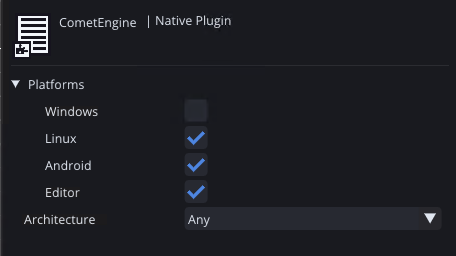
Platforms — four checkboxes: Windows, Linux, Android and Editor. Tick the platforms this exact file can run on. At build time, only the plugins whose platforms include the target are copied into the game; everything else is left out. Editor controls whether the library is loadable while you're in the editor and in play mode — handy to keep on so you can test without exporting.
Architecture — a dropdown: Any, x86_64, x86, arm64-v8a or armeabi-v7a.
- Pick the CPU architecture the binary was compiled for. It then ships only when the build targets that architecture, and the runtime loader looks for it in
Plugins/<architecture>/. - Choose Any for an architecture-agnostic file (rare for native code) — it ships with every architecture.
[!TIP] One "plugin" is usually several imported files — a Windows
.dll, a Linux.so, an Android.soper ABI — each with its own Platforms/Architecture settings.NativeLibrary::Load("mymath")picks the right one for wherever the game is running.
Loading a plugin from AngelScript
The scripting API lives in the CometEngine::Native namespace. Load a library by logical name — no lib prefix, no extension — and Comet resolves it to the right file for wherever the game is running. In the editor it matches the name against every imported Native Plugin asset, wherever it lives in the project or a package, preferring the one built for the current architecture. In an exported build the matching binaries have been gathered into a Plugins/ folder next to the game, so the loader searches Plugins/<arch>/ and Plugins/, then falls back to the operating-system search path.
using namespace CometEngine;
using namespace CometEngine::Native;

class PluginDemo : CometBehaviour
{
    void Start()
    {
        // Load never returns null — always check IsLoaded().
        NativeLibrary@ lib = NativeLibrary::Load("mymath");
        if (!lib.IsLoaded())
        {
            Debug::LogError("plugin failed: " + lib.GetError());
            return;
        }
        Debug::Log("loaded from " + lib.GetPath());

        // Resolve a function by its exported symbol + C prototype:
        NativeFunction@ add = lib.GetFunction("my_add", "int(int,int)");
        if (add.IsValid())
        {
            int sum = add.Call().Int(20).Int(22).InvokeInt();
            Debug::Log("my_add(20, 22) = " + sum);   // 42
        }
    }
}
Describing a function: the signature
A signature is a C prototype written as returnType(argType, argType, …) from these tokens:
void · bool · int · uint · int64 · uint64 · float · double · ptr · str
ptr passes a raw address as a uint64 (a buffer, a resolved symbol, or 0 for null); str marshals an AngelScript string as a UTF-8 const char* valid for the duration of the call. So "bool(ptr,str)" is bool fn(void*, const char*).
Making the call
GetFunction gives you a NativeFunction. Start a call with Call(), push the arguments in order with the chainable Int/UInt/Int64/UInt64/Bool/Float/Double/Ptr/Str methods, then finish with the Invoke* that matches the return type:
lib.GetFunction("set_volume", "void(float)").Call().Float(0.8f).InvokeVoid();

bool ok = lib.GetFunction("init", "bool()").Call().InvokeBool();

// A function that returns 'const char*' returns a pointer — read it back:
uint64 ptr = lib.GetFunction("get_name", "ptr()").Call().InvokePtr();
string name = Native::ReadCString(ptr);
The pushed argument count must match the signature or the call is rejected and returns a zero value.
Structs, out-parameters and raw memory
For functions that read or write a struct, allocate a NativeBuffer — a bounds-checked block of native memory — pass its address as a ptr, then read the fields back by byte offset:
// struct Vec2 { float x, y; };  void get_position(Vec2* out);
NativeBuffer@ buf = NativeBuffer::Create(8);        // two floats
lib.GetFunction("get_position", "void(ptr)").Call().Ptr(buf.GetAddress()).InvokeVoid();

float x = buf.Float(0);
float y = buf.Float(4);
The Native:: namespace also has free helpers to peek raw addresses returned by a call — ReadInt32, ReadFloat, ReadCString, ReadBytes(addr, len) and the Write* counterparts.
Is it even supported here?
Native calls work on Windows, Linux and Android. They're not available in Web builds for now — a browser has no way to load a native binary — so always guard plugin code with Native::IsSupported() and provide a fallback:
if (!Native::IsSupported())
    return;   // e.g. a Web build — no native plugins here

Debug::Log("running on " + Native::GetOS() + " / " + Native::GetArchitecture());
How plugins ship
When you export a build, Comet gathers the plugins whose settings match the target — wherever they live in your project — and leaves everything else out:
| Platform | Where the binary lands |
|---|---|
| Windows / Linux | a Plugins/ folder next to the game executable |
| Android | packed into the APK/AAB's jniLibs/<abi>/, so the system loader finds it by name |
| Web | not supported for now — browsers can't load native binaries |
The runtime loader mirrors this: in a build it searches Plugins/<arch>/, Plugins/, then the executable's own folder; on Android it resolves the library straight out of the packed native libraries.
[!NOTE] Android naming. Android loads native libraries by their
lib….soname. Name the filelib<something>.so(e.g.libmymath.so) and load it with the logical name —NativeLibrary::Load("mymath")— and Comet adds thelibprefix and.sosuffix for you.
Cleaning up
A loaded library and its resolved functions stay alive as long as your script holds the handles. Call lib.Unload() to free the OS module early — every NativeFunction resolved from it becomes unusable afterward — or just let the handle go out of scope.
Where to go next
Native plugins let you wrap an entire third-party library as a clean AngelScript API and hand it out as a reusable package — drop the binaries anywhere in the package, next to the script that wraps them works nicely. When you're ready to distribute, the Exporting Builds tutorial covers how the matching plugins are bundled for each platform.