Navigation: NavMesh, Agents & Obstacles
Enemies that chase, NPCs that wander, units that flow around each other — 2D pathfinding in Comet is built on a baked navigation mesh, A* path queries with funnel smoothing, and optional RVO collision avoidance so crowds of agents don't clip through one another.
The building blocks
Four behaviours, all under Add Behaviour:
| Behaviour | Role |
|---|---|
| Navigation Region | Defines where walking is possible and bakes the navmesh. |
| Navigation Agent | Asks for paths and follows them; optionally avoids other agents. |
| Navigation Obstacle | Carves holes in the navmesh and/or pushes agents away dynamically. |
| Navigation Link | Connects two points that aren't walkable-between — jumps, teleporters, bridges. |
Setting up the walkable area
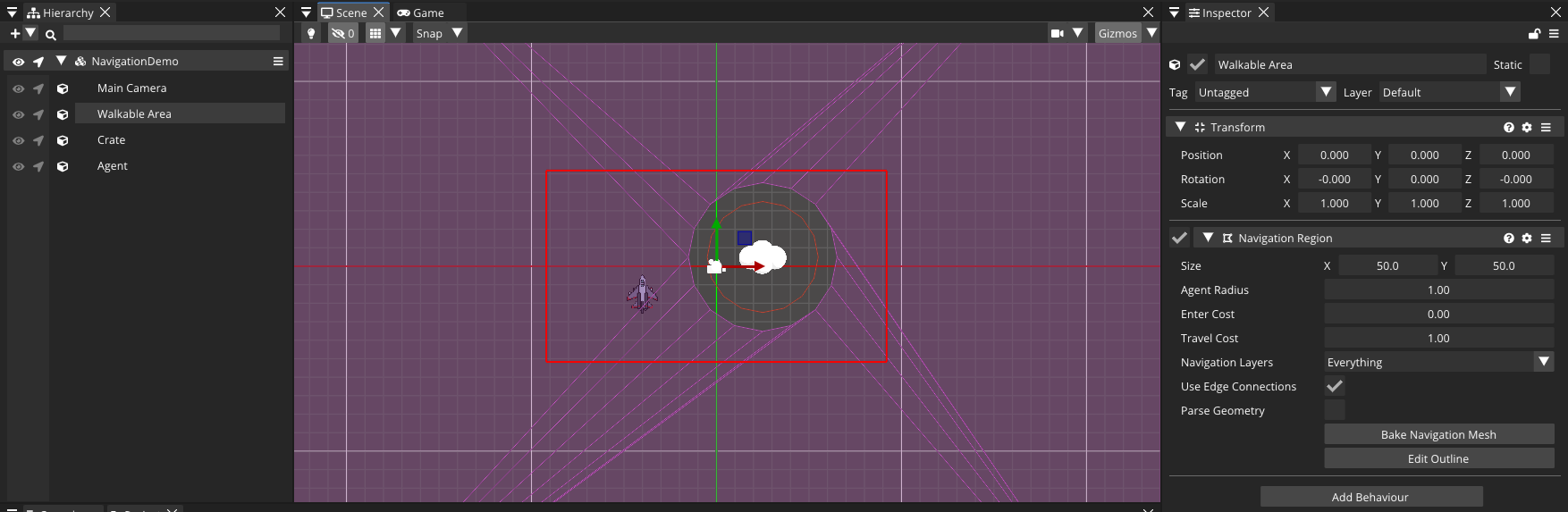
- Create an entity and add a Navigation Region.
- Set its Size — the rectangle to bake — or click Edit Outline and drag the green vertices to author any closed polygon.
- Set Agent Radius: the mesh is inset by this amount so paths never hug walls tighter than your agents can fit.
- Enable Parse Geometry if you want solid (non-trigger) colliders carved out automatically, and choose which physics layers with Parse Collision Mask.
- Press Bake Navigation Mesh.
The baked, walkable polygons show as a colored overlay when scene gizmos are enabled. Multiple regions connect automatically where they touch (and across small gaps if Use Edge Connections is on). Regions also support pathfinding costs — raise Travel Cost above 1 to make agents prefer going around mud, or Enter Cost to penalize entering at all.
[!NOTE] Baking happens on background threads at runtime too: call
region.Bake()from script after you move platforms around or spawn structures, and agents re-path automatically when the new mesh is ready.
Moving an agent
Add a Navigation Agent to your character. The core loop is: set targetPosition, then every physics step walk toward GetNextPathPosition(). This is the Sandbox project's agent, verbatim:
using namespace CometEngine;
using namespace CometEngine::Navigation;

class AgentTest : CometBehaviour
{
    Vector2 desiredPos;
    float velocity = 7.0F;
    NavigationAgent agent;

    // Called before first frame
    void Start()
    {
        agent = NavigationAgent::Get(entity);

        // While avoidance is enabled the simulation reports the collision-free
        // velocity through the onVelocityComputed signal, so the body is moved
        // from inside that callback.
        agent.onVelocityComputed.Add(CometDelegateVector2(OnVelocityComputed));

        // Where the agent should navigate to.
        agent.targetPosition = desiredPos;
    }

    // Called every physics update
    void FixedUpdate()
    {
        if (agent.IsNavigationFinished())
        {
            return;
        }

        Vector2 currentPosition = Vector2(transform.position.x, transform.position.y);
        Vector2 nextPathPosition = agent.GetNextPathPosition();
        Vector2 newVelocity = (nextPathPosition - currentPosition).Normalized() * velocity;

        if (agent.avoidanceEnabled)
        {
            // Submit the desired velocity; the safe velocity arrives through onVelocityComputed.
            agent.SetVelocity(newVelocity);
        }
        else
        {
            // No avoidance: move straight away with the desired velocity.
            OnVelocityComputed(newVelocity);
        }
    }

    // Receives the collision-free velocity from the avoidance simulation and moves the body with it.
    void OnVelocityComputed(Vector2 safeVelocity)
    {
        transform.Translate(safeVelocity * Time::GetDeltaTime(), Space::World);
    }
}
Three things to notice:
- Setting
targetPositiontriggers the path query. Change it any time — chasing a moving player means updating it every few frames. GetNextPathPosition()is called every step and advances through the corridor as you approach each waypoint (withinpathDesiredDistance).- The same movement code works with and without avoidance by funnelling both cases through one callback.
Knowing where you stand
agent.IsNavigationFinished();   // path exhausted (arrived, or nothing reachable)
agent.IsTargetReached();        // within targetDesiredDistance of the target
agent.IsTargetReachable();      // can the path actually end at the target?
agent.DistanceToTarget();       // straight-line distance
agent.GetPathLength();          // full length of the current path
array<Vector2> path = agent.GetCurrentNavigationPath();  // all waypoints, world space
And if you prefer events over polling, agents expose signals: onPathChanged, onWaypointReached, onLinkReached, onTargetReached, onNavigationFinished and the onVelocityComputed you already met.
Tuning the path
The agent inspector groups the important knobs:
| Property | Effect |
|---|---|
| Path Desired Distance | How close to a waypoint before advancing to the next. |
| Target Desired Distance | How close to the target counts as "arrived". |
| Path Max Distance | If the agent drifts further than this from the corridor, a fresh path is queried. |
| Path Postprocessing | Corridor Funnel (taut, natural paths — default), Edge Centered (through edge midpoints — good for grid games), None (raw polygon centroids). |
| Simplify Path | Ramer-Douglas-Peucker reduction; Simplify Epsilon sets the tolerance. |
| Navigation Layers | Bitmask matched against regions/links — agents only traverse matching layers. |
Navigation layers let one navmesh serve different movement types: mark water regions with a Water layer and only amphibious agents will consider them.
Local avoidance (RVO)
Pathfinding keeps agents out of walls; avoidance keeps them out of each other. Tick Avoidance Enabled and configure:
- Avoidance Radius — the agent's personal space.
- Max Speed — a hard clamp the simulation may return.
- Neighbor Distance / Max Neighbors — how far and how many other agents to consider.
- Time Horizon Agents / Obstacles — how many seconds ahead collisions are predicted. Small = late, sharp dodges; large = early, gentle arcs.
- Avoidance Priority — 0–1; lower-priority agents yield to higher-priority ones. Give the boss
1.0and the minions scatter. - Avoidance Layers / Mask — which avoidance layers this agent occupies / respects.
With avoidance on, you must drive movement through the callback: call agent.SetVelocity(desired) each step and apply only the safeVelocity you receive in onVelocityComputed — exactly like the sample above.
Dynamic obstacles
Add a Navigation Obstacle to anything agents should not walk through — a crate the player can push, a car that parks across the sidewalk. Choose its shape (Obstacle Type: Circle radius, Box size + offset, or a custom Polygon via Edit Shape / SetVertices()), then pick how it acts:
- Carve Navigation Mesh — cuts a hole in every overlapping region's navmesh, so paths route around it from the start.
- Avoidance Enabled — feeds it to the RVO simulation, so moving agents steer around it even mid-path.
Use carving for static-ish blockers, avoidance for anything that moves, or both for heavy movable objects.
Navigation links
A Navigation Link joins Start Position and End Position across unwalkable space — a gap to jump, a ladder, a teleporter pad. Set Bidirectional off for one-way drops, and tune Enter Cost / Travel Cost so the pathfinder weighs the shortcut fairly. When an agent reaches a link waypoint, the onLinkReached signal fires — that's your cue to play the jump animation and move the body across.
Gotchas worth knowing
[!WARNING]
- Bake before you expect paths. No baked region = no navmesh = every query fails. Bake in the editor, or call
Bake()after loading.- Custom outlines need at least 3 vertices; the editor falls back to the rectangle otherwise.
- Only solid, non-trigger colliders are carved by Parse Geometry.
- An unreachable target leaves the path empty: check
IsTargetReachable()and design a fallback (wander, wait, growl menacingly).
Where to go next
Make your navigating enemies look alive with Animation & the Animator, or sync their positions across the network in Networking & Multiplayer.