Bézier Curves & Paths
Moving platforms that sweep along a smooth arc, a camera that glides through a level, a projectile that curves to its target — all of these follow a Bézier curve. Comet gives you a Bézier Curve behaviour to author the path and a Bézier Curve Follower to move any transform along it.
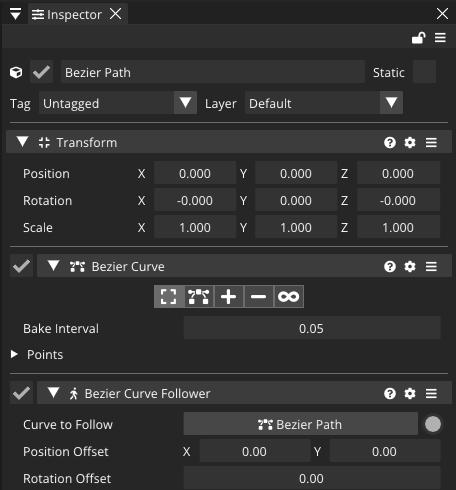
The two components
Both are added from Add Behaviour → Diverse:
- Bézier Curve — stores the path as a cubic spline: a list of control points, each with an anchor and two tangent handles. Its inspector has a small toolbar to Move Points, Move Control Points, Add Points and Remove Points directly in the scene view, plus a Bake Interval (how finely the curve is sampled for fast lookups).
- Bézier Curve Follower — moves a transform along a target curve, optionally rotating to face the direction of travel.
Authoring a curve in the editor
- Add a Bézier Curve to an entity and select it.
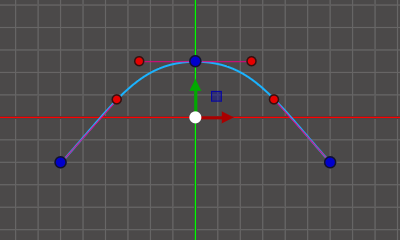
- Click Add Points in its inspector toolbar, then click in the scene to drop anchor points — the green spline appears between them.
- Switch to Move Control Points and drag the tangent handles to bend each segment.
- Tweak the Bake Interval down for a smoother, more accurate follow (at a small memory cost).
Following a curve
Add a Bézier Curve Follower, set Curve to Follow to your curve, then advance it every frame. You drive the distance yourself, which keeps movement speed independent of the curve's length:
using namespace CometEngine;

class Platform : CometBehaviour
{
    private BezierCurveFollower follower;
    private float distance = 0.0F;
    float speed = 2.0F;   // world units per second

    void Start()
    {
        follower = BezierCurveFollower::Get(entity);
        follower.loop = true;          // wrap around at the ends
        follower.applyRotation = false; // a platform stays level
    }

    void Update()
    {
        distance += speed * Time::GetDeltaTime();
        follower.MoveAt(distance, transform);
    }
}
MoveAt(distance, transform)places the transform at an absolute arc-length distance along the curve. Withloop = truethe distance wraps; withloop = falseit clamps at the ends.MoveAtNormalized(t, transform)takestfrom 0 to 1 instead — handy when you're driving progress from an animation or a timer rather than a speed.
Facing the direction of travel
For a projectile or a character, tick Apply Rotation and the follower rotates the transform to point along the curve's tangent. Look Ahead sets how far along the curve it samples that tangent — smaller for fast, twitchy followers; larger for slow, smooth ones. Rotation Offset adds a fixed angle (if your sprite faces up instead of right), and Position Offset shifts it along/perpendicular to the path.
using namespace CometEngine;

class HomingMissile : CometBehaviour
{
    private BezierCurveFollower follower;
    private float distance = 0.0F;
    float speed = 12.0F;

    void Start()
    {
        follower = BezierCurveFollower::Get(entity);
        follower.applyRotation = true;   // nose follows the curve
        follower.lookAhead = 0.03F;
        follower.loop = false;

        BezierCurve curve = BezierCurve::Get(entity);
        float length = curve.curve.length;
        Debug::Log("flight path is " + length + "m long");
    }

    void Update()
    {
        distance += speed * Time::GetDeltaTime();
        follower.MoveAt(distance, transform);
    }
}
[!TIP] The follower does not move on its own — you accumulate
distanceand callMoveAteach frame. That's deliberate: it lets you ease, reverse, pause or ping-pong the motion however you like, and drive several followers along the same shared curve at different speeds.
Building a curve from code
You can author the path entirely in script — useful for procedural levels or runtime-generated trajectories:
using namespace CometEngine;

class RuntimePath : CometBehaviour
{
    void Start()
    {
        Curve curve = BezierCurve::Get(entity).curve;
        curve.AddPoint(Vector2(0.0F, 0.0F), -1);   // -1 appends
        curve.AddPoint(Vector2(5.0F, 3.0F), -1);
        curve.AddPoint(Vector2(10.0F, 0.0F), -1);

        // Shape the segments with tangent handles.
        curve.SetControlPointOut(0, Vector2(2.0F, 0.0F));
        curve.SetControlPointIn(1, Vector2(3.0F, 2.0F));

        Debug::Log("baked length: " + curve.length);
    }
}
AddPoint, SetControlPointIn/Out, RemovePoint and ClearPoints edit the point list; CalculatePointAt(distance, cubic) and GetClosestPoint(worldPoint) sample it. The bake cache rebuilds automatically after edits — do heavy building in Start, not every frame.
Where to go next
Combine a curve-following camera with your UI, or trigger a projectile's launch from an input action or animation event.