2D Lights & Shadows
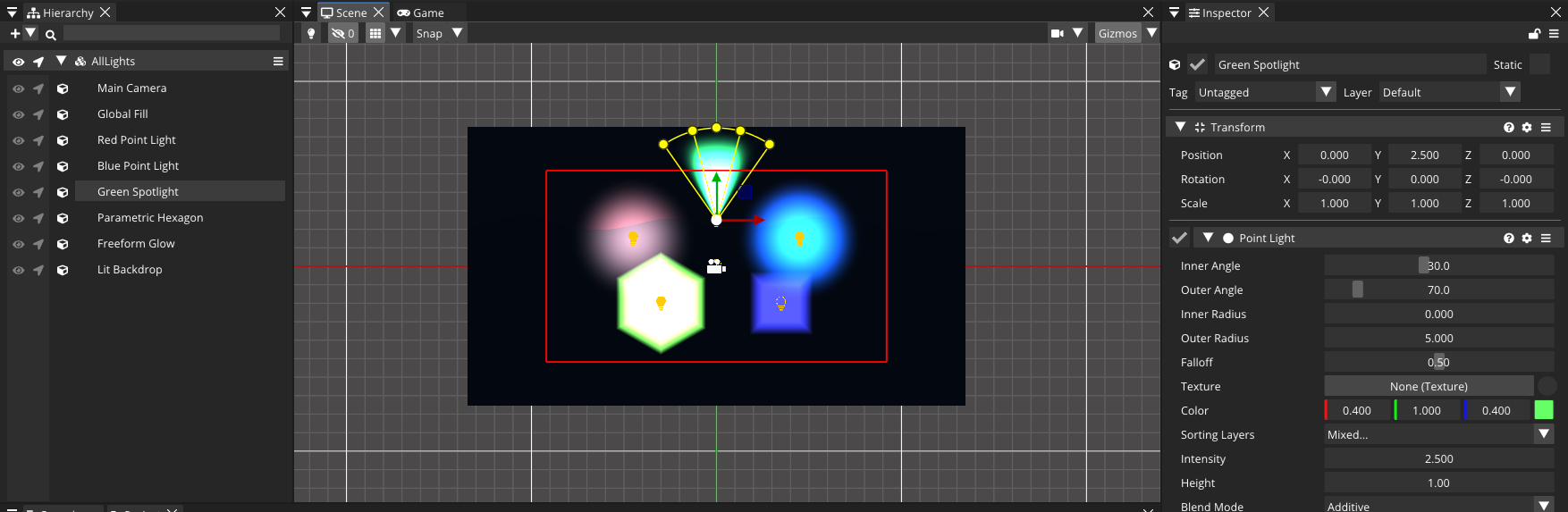
Lighting turns a flat scene into a moody one. Comet ships a full 2D lighting pipeline: five light types, four blend modes, soft and crisp shadows, and normal-map support — all layer-aware and fully scriptable.
How 2D lighting works in Comet
Lights in Comet accumulate into a per-sorting-layer light buffer. That single sentence has two important consequences:
- Every light declares which sorting layers it affects. By default the All Sorting Layers toggle is on and the light reaches everything; untick it to pick specific layers — a light whose list doesn't include the layer a sprite renders on will never touch that sprite, no matter how close it is.
- Lights compose with a blend mode, per light:
| Blend Mode | Effect |
|---|---|
Additive |
Brightens what is below — the default for almost everything. |
Subtract |
Darkens — great for pockets of darkness or negative lights. |
Mix |
Alpha-blends the light color over the layer. |
Mask |
Multiplies — use it to reveal or hide by light shape. |
There is no separate "ambient light" setting: an ambient is simply a GlobalLight with a low intensity added to your layers.
The five light types
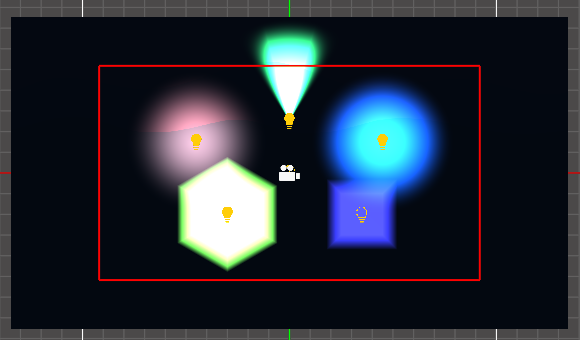
All lights are behaviours added from Add Behaviour → Lighting (Global Light, Point Light, Freeform Light, Parametric Light, Sprite Light). They share a common base (color, intensity, blend mode, shadows, sorting layers) and each adds its own shape:
GlobalLight
A directional, sun-like light that hits everything on its layers equally, regardless of position. Use it for ambient fill and daylight. Its only extra property is Max Shadow Distance — how far from the view shadows are still rendered (0 = unlimited).
PointLight
Light radiating from a point, with angular and radial falloff — your lamps, torches, spotlights, projectiles:
- Inner / Outer Radius — full intensity inside the inner radius, fading to zero at the outer one.
- Inner / Outer Angle — narrow these from 360° to make a cone spotlight.
- Falloff — the shape of the fade curve (0–1).
- Texture — optional cookie texture to mask the light.
FreeformLight
A light whose shape is a custom polygon you edit right in the scene view — click Edit Shape in its Inspector and drag the vertices. Ideal for light shafts through windows or oddly-shaped glowing areas. Falloff Radius controls how far the light fades past the polygon's edges.
ParametricLight
Like Freeform, but the shape is a regular polygon: pick the number of Sides (3–39, higher ≈ circle) and a Radius. Cheaper than Freeform and perfect for simple geometric glows.
SpriteLight
The light's shape is a sprite: its alpha channel masks the light. Stained-glass windows, glowing signs, projected logos. Cookie Scale and Cookie Offset adjust the sprite within the light.
Common light properties
Every light exposes these in the Inspector:
| Property | Meaning |
|---|---|
| Color | The light's color. |
| Intensity | Multiplier over the color — values above 1 overdrive, negative values darken. |
| Sorting Layers | The layers this light affects — All Sorting Layers by default, or a hand-picked list. |
| Height | Virtual Z height used by normal-mapped sprites to fake relief. No normal map → no visible effect. |
| Blend Mode | Additive, Subtract, Mix or Mask. |
| Cast Shadows | Enables shadow rendering for this light (see below). |
Shadows
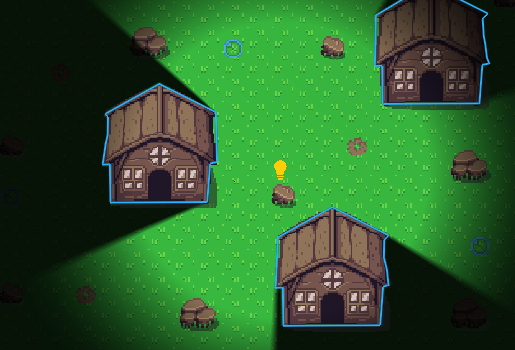
Two pieces cooperate to produce 2D shadows:
Lights opt in with Cast Shadows and choose a Shadow Mode:
Soft— ray-marched, soft-edged penumbras. Prettier, more expensive. Shadow Softness controls the penumbra.Crisp— sharp shadow-map shadows. Cheap and stylized.
Both modes share Shadow Color (the tint of shadowed areas) and Shadow Strength (0 = invisible, 1 = fully dark).
Occluders are entities with a Shadow Caster behaviour (Add Behaviour → Lighting → Shadow Caster). Its Shape Source is either:
Sprite— reuses the occluder polygon authored in the Sprite Editor's Shadow Caster tool, orCustom— a polygon you edit in the scene, with a Closed toggle and a Cull Mode for one-sided shadows.
Shadow Casters also filter by Sorting Layers, so an occluder only blocks lights on matching layers.
Scripting lights
Lights are regular behaviours: fetch them with the static Get accessor and drive any property. A flickering torch:
using namespace CometEngine;

class TorchLight : CometBehaviour
{
    private PointLight torch;
    private float time = 0.0F;

    void Start()
    {
        torch = PointLight::Get(entity);
        torch.color = Color(1.0F, 0.7F, 0.3F, 1.0F); // warm orange
        torch.outerRadius = 4.0F;
        torch.fallOff = 0.6F;
        torch.castShadows = true;
        torch.shadowMode = ShadowMode::SOFT;
        torch.shadowSoftness = 0.8F;
    }

    void Update()
    {
        // Two overlapping sine waves make a cheap, organic flicker.
        time += Time::GetDeltaTime();
        torch.intensity = 1.5F + Math::Sin(time * 9.0F) * 0.15F + Math::Sin(time * 23.0F) * 0.08F;
    }
}
A day/night cycle driving a GlobalLight, including which layers it lights:
using namespace CometEngine;

class DayNightCycle : CometBehaviour
{
    private GlobalLight sun;
    private float dayTime = 0.0F;      // 0..1 over a full day
    float dayLengthSeconds = 120.0F;

    void Start()
    {
        sun = GlobalLight::Get(entity);

        array<string> layers = {"Background", "Default", "Characters"};
        sun.SetSortingLayers(layers);
    }

    void Update()
    {
        dayTime += Time::GetDeltaTime() / dayLengthSeconds;
        if (dayTime > 1.0F)
        {
            dayTime -= 1.0F;
        }

        // Bright warm white at noon, dim blue at midnight.
        float daylight = (Math::Sin(dayTime * 6.2831853F) + 1.0F) * 0.5F;
        sun.intensity = 0.25F + daylight * 0.9F;
        sun.color = Color(0.55F + daylight * 0.45F,
                          0.6F + daylight * 0.4F,
                          0.8F + daylight * 0.1F,
                          1.0F);
    }
}
Every light type has the same accessors as any behaviour — PointLight::Get(entity), PointLight::GetAll(entity), PointLight::GetInParent(entity), PointLight::GetInChildren(entity) — and the generic BaseLight::Get(entity) works when you don't care which kind it is.
Normal maps and the Height property
If a sprite has a normal map assigned (via the Sprite Editor's Secondary Textures tool), lights shade it as if it had depth. The light's Height property is its virtual distance above the 2D plane: low values give dramatic, grazing relief; high values flatten the effect. Without a normal map, height changes nothing — don't be surprised when the slider seems dead on flat art.
Performance notes
- Crisp shadows are cheaper than Soft — reserve soft shadows for hero lights.
- Shape cost grows with complexity: Point < Parametric < Freeform.
- Lights only pay for the sorting layers they affect. Keep the
Sorting Layerslists tight. - A handful of lights is fine on every platform; hundreds of shadow-casting lights are not. Profile on your weakest target.
Where to go next
Combine lights with the sprites you set up in Sprite Rendering, or give your scene motion with Animation & the Animator.