Particle Systems
Fire, smoke, sparks, magic, rain, explosions — all of it comes from the Particle System, a modular emitter modelled after Unity's. You start with an emitter and switch on modules — emission, shape, colour-over-lifetime, velocity, size, texture animation — each shaping the particles a little more.
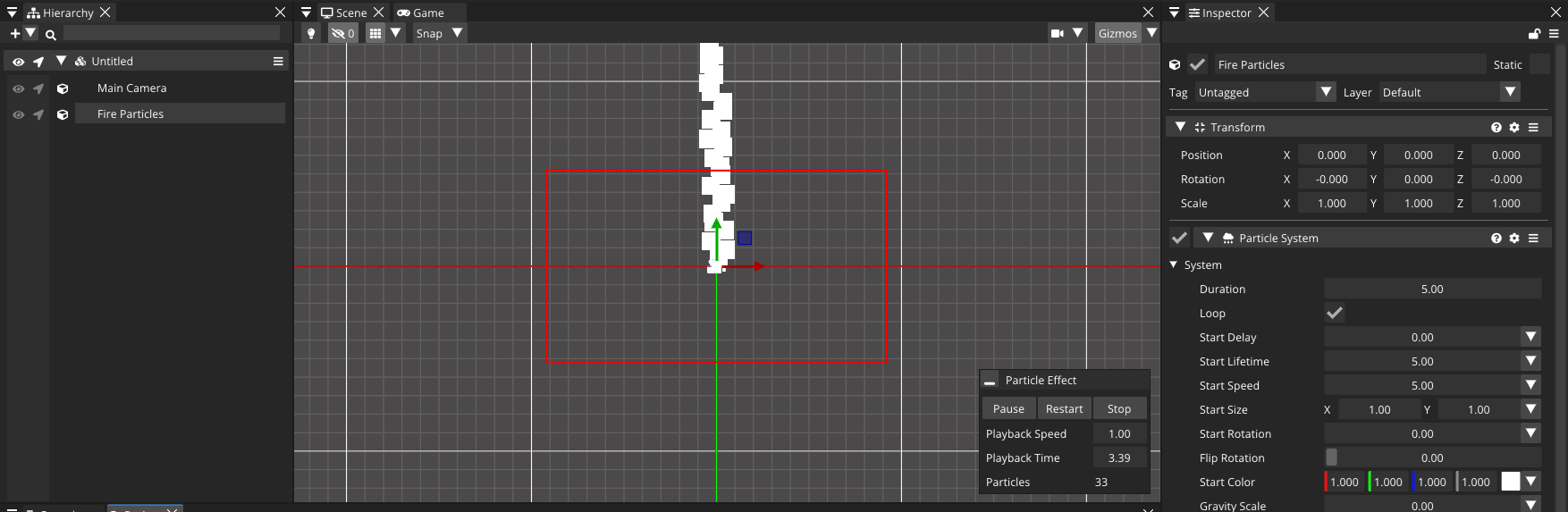
The emitter and its modules
Add a Particle System from Add Behaviour and it starts emitting immediately in the editor, with a preview overlay (Play / Pause / Stop, playback speed and a scrubber) in the scene view.
The top of the inspector is the System block — the properties every particle is born with:
- Duration and Loop — the length of one emission cycle and whether it repeats.
- Start Lifetime / Start Speed / Start Size / Start Rotation / Start Color — initial values. Each is a value selector: a constant, a random range, or a curve/gradient over the cycle.
- Gravity Scale, Max Particles, Simulation Space (
Localfollows the emitter,Worldleaves particles behind), and Play On Awake.
Below that sit the toggleable modules, each with an enable checkbox:
| Module | Effect |
|---|---|
| Emission | Rate-per-second plus timed Bursts. |
| Shape | Where particles spawn: Circle, Rectangle or Edge. |
| Velocity / Force / Limit Velocity over Lifetime | Push, drag and steer particles as they age. |
| Color / Size / Rotation over Lifetime | Fade, grow and spin over each particle's life. |
| Color / Size / Rotation by Speed | Modulate by how fast a particle is moving. |
| Texture Animation | Flipbook the particle sprite from a sheet or sprite list. |
| Renderer | Draw mode (Chunk batches, Individual allows per-particle material) and sort order. |
Value selectors and gradients
The recurring pattern is the value selector — wherever you see a property like Start Size or a lifetime curve, it can be a constant, a random between two values, or a curve (float) / gradient (colour) sampled over the particle's normalized age. This is what makes a flame fade from white to orange to transparent, or embers shrink as they rise.
Controlling it from AngelScript
using namespace CometEngine;
using namespace CometEngine::ParticleSystemModule;

class Explosion : CometBehaviour
{
    void Start()
    {
        ParticleSystem particles = ParticleSystem::Get(entity);
        particles.loop = false;
        particles.maxParticles = 500;

        // Configure emission with a one-shot burst of debris.
        ParticlePropertyEmission emission = particles.emission;
        emission.enabled = true;

        Burst burst;
        burst.time = 0.0F;
        burst.probability = 1.0F;
        burst.count.constant = 60;
        emission.AddBurst(burst);

        particles.Play();
    }

    void Update()
    {
        ParticleSystem particles = ParticleSystem::Get(entity);
        // Emit a puff of smoke on demand.
        if (Input::GetKeyDown(KeyCode::SPACE))
        {
            particles.Emit(20);
        }
    }
}
Play(), Pause(), Stop(), Clear() and Emit(count) drive playback; Simulate(time, restart) fast-forwards the simulation (handy for pre-warming an effect so it looks established the instant it appears). Read-only isPlaying, isEmitting, particleCount and isAlive report state.
[!TIP]
simulationSpace = ParticleSystemSimulationSpace::WORLDis the difference between a torch flame that drags a trail as the torch moves (World) and one that stays glued to the torch (Local). Pick per effect.
Building a fire effect
The classic recipe, all in the inspector:
- Shape → small
Circleat the base. - Start Color → bright yellow; Color over Lifetime → gradient yellow → orange → transparent.
- Start Size → medium; Size over Lifetime → curve shrinking to zero.
- Velocity over Lifetime → upward, with a little turbulence via the random-between mode.
- Emission → a steady rate, no bursts.
- Renderer → an additive material so overlapping particles glow.
UI particles
Need particles inside a UI canvas — confetti on a victory screen, sparkles on a button? Use UI Particle System instead. It's the same module set but renders in the UI layer under a RectTransform, so it respects canvas sorting and masks. See the UI tutorial for the canvas basics.
Where to go next
Trigger a burst from an animation event, attach one to a networked spawn, or light it dramatically with 2D lights.