Physics: Bodies, Colliders & Joints
Gravity, collisions, bouncing, ragdolls, vehicles — Comet's 2D physics runs on Box2D 3.x. You give an entity a Rigid Body to make it move under physics, one or more Colliders to give it shape, and optionally joints to connect bodies or effectors to push them around.
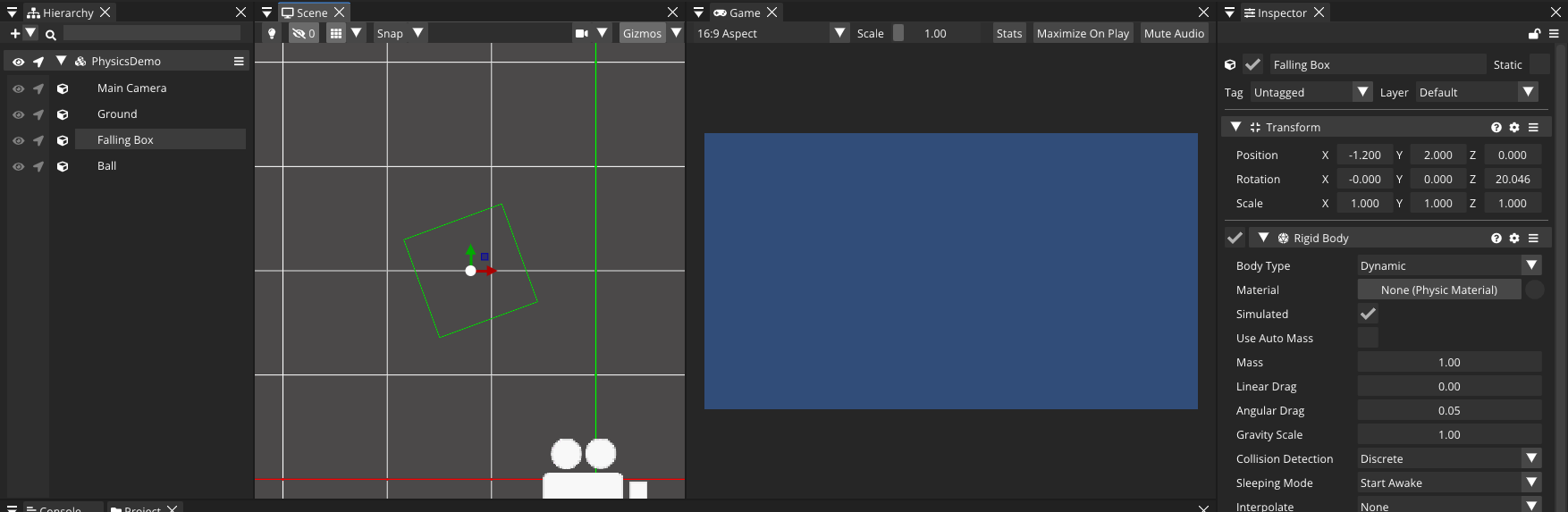
The three body types
Add a Rigid Body and pick its Body Type:
- Dynamic — fully simulated: gravity, forces, collisions. Your player, crates, debris.
- Kinematic — moves only when you set its velocity/position; unstoppable by forces. Moving platforms, scripted hazards.
- Static — never moves. Level geometry. (An entity with only a collider and no rigid body behaves as static.)
The Rigid Body inspector exposes Mass, Gravity Scale, Linear/Angular Drag, axis constraints, Collision Detection (Discrete or Continuous for fast objects) and interpolation.
[!IMPORTANT] Physics units are metres, and simulation runs in
FixedUpdate, notUpdate. Apply forces and read velocities inFixedUpdateso they're consistent with the fixed timestep. If your art is in pixels, divide sizes by your pixels-per-unit (e.g. 100 px = 1 m).
Colliders
Add a collider from Add Behaviour — Box, Circle, Capsule, Edge, Polygon, Tilemap or Packer Collider. They render green outline gizmos in the scene. Each collider has:
- Is Trigger — a trigger detects overlaps but doesn't physically block.
- Friction and Bounciness (restitution), or a shared Physic Material asset carrying both.
- Offset and shape-specific fields (Box
Size, CircleRadius, ...).
Moving a body
using namespace CometEngine;

class PlayerMovement : CometBehaviour
{
    private RigidBody body;
    float moveSpeed = 6.0F;
    float jumpImpulse = 8.0F;

    void Start()
    {
        body = RigidBody::Get(entity);
    }

    void FixedUpdate()
    {
        // Drive horizontal motion by setting the velocity directly — snappy,
        // predictable control that ignores mass. The vertical velocity is left
        // untouched so gravity and jumps still work.
        float dir = 0.0F;
        if (Input::GetKeyPressed(KeyCode::A)) dir -= 1.0F;
        if (Input::GetKeyPressed(KeyCode::D)) dir += 1.0F;
        body.velocity = Vector2(dir * moveSpeed, body.velocity.y);

        // Jump with an instantaneous impulse.
        if (Input::GetKeyDown(KeyCode::SPACE))
        {
            body.ApplyLinearImpulse(Vector2(0.0F, jumpImpulse));
        }
    }
}
[!NOTE] Setting
velocityvs. applying forces. Assigningbody.velocitydirectly gives snappy, mass-independent control — ideal for a responsive player character or a kinematic platform. Forces are for physical, mass-aware motion:ApplyForceaccumulates over the step (thrust, wind, gravity-like pushes) whileApplyLinearImpulsechanges velocity instantly (jumps, hits, knockback). There areAtPointvariants that also impart spin, plusApplyTorque/ApplyAngularImpulsefor rotation. Pick velocity for arcade feel, forces for simulation feel.
Collision and trigger callbacks
Define these methods on any CometBehaviour and the engine calls them:
using namespace CometEngine;

class Hazard : CometBehaviour
{
    // Solid collisions: Enter / Stay / Exit.
    void OnCollisionEnter(Collision collision)
    {
        Debug::Log("hit " + collision.entity.name +
                   " with " + collision.contactPointsCount + " contacts");
    }

    // Trigger overlaps: Enter / Stay / Exit.
    void OnTriggerEnter(Collider other)
    {
        Debug::Log(other.entity.name + " entered the trigger");
    }

    void OnTriggerExit(Collider other)
    {
        Debug::Log(other.entity.name + " left the trigger");
    }
}
OnCollisionEnter/Stay/Exit fire for solid contacts and hand you a Collision (the colliders, bodies, entity and contact points). OnTriggerEnter/Stay/Exit fire for trigger colliders and hand you the other Collider.
Raycasts and queries
Ask the world what's along a ray or inside a box — the foundation of line-of-sight, ground checks and hitscan weapons:
using namespace CometEngine;

class GroundCheck : CometBehaviour
{
    bool IsGrounded()
    {
        Vector2 origin = Vector2(transform.position.x, transform.position.y);
        RaycastHit hit = Physics::RaycastClosest(origin, Vector2(0.0F, -1.0F), 1.1F);
        return hit !is null;
    }

    void FireLaser()
    {
        Vector2 origin = Vector2(transform.position.x, transform.position.y);
        RaycastHit hit = Physics::RaycastClosest(origin, Vector2(1.0F, 0.0F), 50.0F);
        if (hit !is null)
        {
            Debug::Log("laser hit " + hit.collider.entity.name +
                       " at " + hit.distance + "m, normal " + hit.normal.ToString());
        }
    }
}
Physics::RaycastClosest / RaycastAny / Raycast (all hits) return RaycastHits with point, normal, distance, collider and rigidbody. Physics::QueryAABB(center, size, ...) returns every collider in a box. All take an optional layer mask.
Collision layers
Configure which layers collide in Project Settings → Physics (a 32-layer matrix). From code, Physics::IgnoreLayerCollision(a, b, true) and Physics::DoTheseLayersCollide(a, b) manage it at runtime — e.g. make enemy projectiles pass through other enemies.
Joints and effectors
Joints constrain two bodies: Hinge (rotating door, wheel axle, with an optional motor and angle limits), Distance / Spring (ropes, suspension), Slider (elevators), Wheel (vehicles), Fixed, Friction, Relative and Target. Add one, assign the Connected Rigid Body, and set its anchors. A joint fires OnJointBreak(force) if it exceeds its Break Force.
Effectors apply area forces to whatever overlaps them (the collider needs Used By Effector): Area (wind, water currents), Point (gravity wells, explosions), Platform (one-way platforms) and Surface (conveyor belts).
Physic Material assets
Create a Physic Material (Create Resource → Physic Material) to reuse Friction and Bounciness across colliders — an "ice" material, a "rubber" material — and choose how paired materials combine (average, min, max, multiply).
Where to go next
Drive physics from input, react to hits with an animation or particle burst, or build your collision world from a tilemap.